
In our increasingly connected world, a reliable and fast internet connection is paramount. For desktop PC users, the built-in Ethernet and Wi-Fi capabilities of a motherboard can sometimes become a bottleneck, especially if they are older or budget-oriented models. Whether you are a gamer seeking lower latency, a streamer requiring rock-solid stability, or a professional transferring large files, upgrading your internal network hardware can provide a significant performance boost.
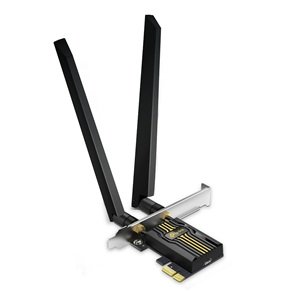
The TP-Link Archer TBE400E is a PCI Express network adapter card designed to bring modern connectivity to any desktop computer with an available slot. It promises to deliver the high speeds and low latency of 2.5 Gigabit Ethernet alongside the convenience of the latest Wi-Fi 6 technology. Let’s analyze its potential to upgrade your system’s networking capabilities.
First Impressions: A Modern Solution for an Internal Upgrade
The card presents a straightforward, no-frills design focused on performance. It is a standard-height PCIe x1 card, making it compatible with a wide range of desktop computer cases. The board features a large heatsink to manage the thermals of the high-speed components, ensuring consistent performance during prolonged, heavy use. The inclusion of both a high-gain Wi-Fi antenna and a 2.5G Ethernet port signals its dual-purpose design.
Key Features for Enhanced Wired and Wireless Performance
This card’s value lies in its ability to future-proof your desktop with two distinct, high-speed connection methods.
1. 2.5 Gigabit Ethernet Port
This is a standout feature for users with a fast local network. While standard motherboards have a 1 Gigabit (1000Mbps) Ethernet port, this card offers a 2.5 Gigabit (2500Mbps) port. If your internet service plan exceeds 1 Gbps or you have a compatible 2.5G router and NAS (Network Attached Storage) for transferring large files, this port can more than double your wired network speed, reducing transfer times and latency significantly.
2. Next-Generation Wi-Fi 6 Connectivity
For wireless connectivity, the card supports the latest Wi-Fi 6 (802.11ax) standard. Wi-Fi 6 offers several advantages over older Wi-Fi 5, including:
- Higher Efficiency: Better performance in crowded environments with multiple devices.
- Lower Latency: Crucial for online gaming and video conferencing.
- Faster Potential Speeds: Supports connection speeds up to 600 Mbps on the 2.4 GHz band and 2400 Mbps on the 5 GHz band.
3. Bluetooth 5.0 for Peripheral Connectivity
In addition to Wi-Fi, the card includes integrated Bluetooth 5.0. This allows you to connect a wide array of wireless peripherals to your desktop, such as headphones, speakers, game controllers, and keyboards, without requiring a separate USB dongle that can occupy a valuable port.
4. Easy PCIe Installation
The card is designed for a simple installation process. It plugs directly into an available PCIe x1 slot on your computer’s motherboard, which is more stable and reliable than a USB adapter. The external magnetic base antenna provides strong signal reception and can be positioned for optimal coverage.
5. Broad Compatibility
The card is designed to work with a wide range of systems. It is compatible with Windows 10 and Windows 11 operating systems. Its driver-based installation ensures it can add modern networking features to older systems that lack them natively, effectively breathing new life into a desktop build.
Ideal Use Cases: Who Is This Network Card For?
The TP-Link Archer TBE400E is an ideal upgrade for:
- Gamers and Streamers: The low latency of a wired 2.5G connection and the stability of Wi-Fi 6 are perfect for competitive gaming and high-quality live streaming.
- Content Creators and Professionals: Anyone who regularly transfers large video, design, or data files across a local network will benefit from the accelerated 2.5G Ethernet speed.
- Owners of Older Desktops: An easy way to add modern Wi-Fi 6 and Bluetooth 5.0 to a system that only has outdated Wi-Fi or no wireless capability at all.
- Users with Fast Internet Plans: If your internet service is 1 Gbps or faster, this card ensures your desktop is not the bottleneck.
Points to Consider
Installation requires opening your computer case and having a basic understanding of PC hardware. While straightforward, it may be intimidating for some users. To achieve the full 2.5G Ethernet speed, your router, switches, and other network devices must also support 2.5GBase-T. The Wi-Fi 6 speeds will also be limited by the capabilities of your wireless router.
Final Verdict
The TP-Link Archer TBE400E is a powerful and versatile networking card that offers a significant upgrade path for any desktop computer. By combining a high-speed 2.5 Gigabit Ethernet port with modern Wi-Fi 6 and Bluetooth 5.0, it provides a comprehensive connectivity solution in a single, affordable package.
For users looking to reduce latency, increase transfer speeds, and embrace the latest wireless standards, this card represents exceptional value. It is a smart investment that can dramatically improve your desktop’s network performance, both on a wired and wireless level, ensuring your system is ready for the demands of today’s digital world.
If the button doesn’t work, please refresh the page.